Hardware health of your PC
New
We will detect the temperatures and voltages of your Windows computer's components for you.
Discover our other tools to stabilize and optimize your PC
Driver detection and download
Component and software detection
System crash analysis (BSOD)
Service preview
DriversCloud.com
Configuration history
No configuration detected
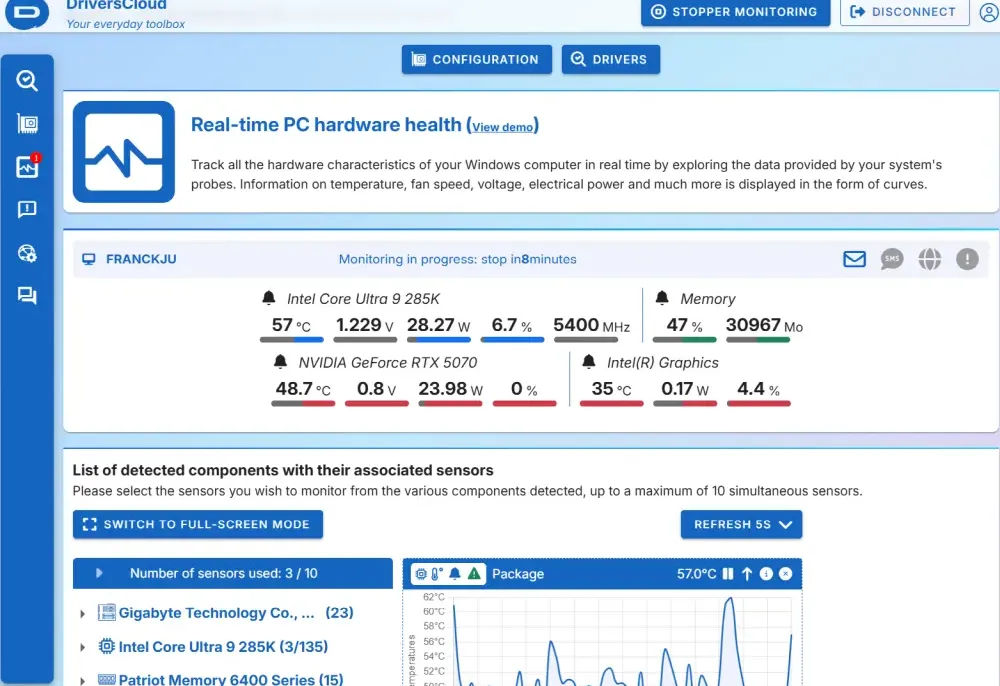
Readings from your computer's sensors
Install our monitoring agent to retrieve all your computer's measurements. Here's how the 3 steps work.
Installing the monitoring agent
Click on the "Start monitoring" button below and follow the instructions.
Measurement retrieval
Once the agent has been installed, you will be prompted to start monitoring your computer. Accept and continue.
Visualize your measurements
View all your computer's sensor readings in the form of graphs to which you can assign alerts.
v
i
Privacy information
Your privacy is our priority: here are the rules DriversCloud applies to protect your information.
Analyse another computer
A computer linked to your account shows up in “Start a detection”: you can then analyse it remotely, without sitting in front of it.
Which computer do you want to analyse?
Answer, and we only show what applies to you.
This one
The computer in front of you
Another one
Another machine, here or elsewhere
They trust us

Géneration NT
Géneration NT about us
How do you find and install a driver to run an undetected peripheral on your computer?

MALEKAL
MALEKAL about us
DriversCloud: identify hardware and install Windows drivers 11/10


Clubic
Clubic about us
Drivers Cloud, the website that updates your hardware drivers, has a new look


Lifewire
Lifewire about us
A full review of DriversCloud, including how to use this free driver updater tool to get drivers directly from the manufacturer
What is the purpose of hardware monitoring?
Monitor the health of your PC in real time
Our hardware monitoring service , integrated with DriversCloud - a 100% in-house developed software - offers you a complete and detailed view of your Windows computer.
✔ Live temperatures: processor (CPU), hard drives, random access memory (RAM)...
✔ Fan speeds: track their rotation and ensure optimal cooling.
✔ System voltages: keep an eye on the power supply to your components.
Thanks to DriversCloud, you stay in control and anticipate the slightest signs of weakness in your machine.
Our hardware monitoring service , integrated with DriversCloud - a 100% in-house developed software - offers you a complete and detailed view of your Windows computer.
✔ Live temperatures: processor (CPU), hard drives, random access memory (RAM)...
✔ Fan speeds: track their rotation and ensure optimal cooling.
✔ System voltages: keep an eye on the power supply to your components.
Thanks to DriversCloud, you stay in control and anticipate the slightest signs of weakness in your machine.
When should I use the hardware monitoring service?
Keep your PC under control
TheDriversCloud agent installs directly on your computer and continuously monitors essential data: temperatures, voltages, fan speeds...
✔ Anticipate breakdowns: immediately detect overheating or overvoltage before a problem occurs.
✔ Understand your crashes: analyze the hidden causes of Windows crashes, even when everything seems normal.
✔ Extend lifetime: safeguard your components against overheating and ensure lasting stability.
DriversCloud, the essential tool for a reliable, stable PC that's ready to last.
TheDriversCloud agent installs directly on your computer and continuously monitors essential data: temperatures, voltages, fan speeds...
✔ Anticipate breakdowns: immediately detect overheating or overvoltage before a problem occurs.
✔ Understand your crashes: analyze the hidden causes of Windows crashes, even when everything seems normal.
✔ Extend lifetime: safeguard your components against overheating and ensure lasting stability.
DriversCloud, the essential tool for a reliable, stable PC that's ready to last.
How do you interpret the information provided by probes and sensors?
Understanding your PC's data
Obviously, it's not always easy to interpret the multitude of information gathered: how do you know if the values are correct? At what threshold does a temperature or voltage become dangerous for your computer?
✔ Experts know how to decode: if you're a tinkerer or a geek, you already know how to read this data.
✔ A community at your side: if not, the enthusiasts on our forum will be delighted to help you and share their tips for maintaining your PC.
Don't be left alone with the numbers, benefit from the experience of the DriversCloud community.
Obviously, it's not always easy to interpret the multitude of information gathered: how do you know if the values are correct? At what threshold does a temperature or voltage become dangerous for your computer?
✔ Experts know how to decode: if you're a tinkerer or a geek, you already know how to read this data.
✔ A community at your side: if not, the enthusiasts on our forum will be delighted to help you and share their tips for maintaining your PC.
Don't be left alone with the numbers, benefit from the experience of the DriversCloud community.